
Documentation
Introduction
- Overview
- Getting Started
- Support for K8s Installers
- Deploying on Kind
- Deploying on Minikube
- Configuration
- Installing with Helm
Cloud Deployment
Reference
- Antrea Network Policy
- Antctl
- Architecture
- Traffic Encryption (Ipsec / WireGuard)
- Securing Control Plane
- Security considerations
- Troubleshooting
- OS-specific Known Issues
- OVS Pipeline
- Feature Gates
- Antrea Proxy
- Network Flow Visibility
- Traceflow Guide
- NoEncap and Hybrid Traffic Modes
- Egress Guide
- NodePortLocal Guide
- Antrea IPAM Guide
- Exposing Services of type LoadBalancer
- Traffic Control
- BGP Support
- Versioning
- Antrea API Groups
- Antrea API Reference
Windows
Integrations
Cookbooks
Multicluster
Developer Guide
Project Information
Antrea Multi-cluster Quick Start
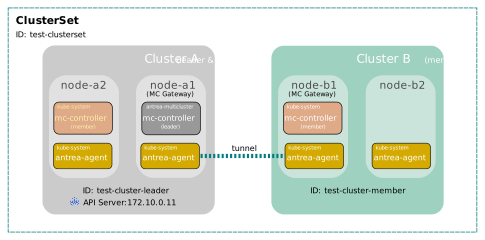
In this quick start guide, we will set up an Antrea Multi-cluster ClusterSet
with two clusters. One cluster will serve as the leader of the ClusterSet, and
meanwhile also join as a member cluster; another cluster will be a member only.
Antrea Multi-cluster supports two types of IP addresses as multi-cluster
Service endpoints - exported Services' ClusterIPs or backend Pod IPs.
We use the default ClusterIP endpoint type for multi-cluster Services
in this guide.
The diagram below shows the two clusters and the ClusterSet to be created (for simplicity, the diagram just shows two Nodes for each cluster).
Preparation
We assume an Antrea version >= v1.8.0 is used in this guide, and the Antrea
version is set to an environment variable TAG. For example, the following
command sets the Antrea version to v1.8.0.
export TAG=v1.8.0
To use the latest version of Antrea Multi-cluster from the Antrea main branch,
you can change the YAML manifest path to: https://github.com/antrea-io/antrea/tree/main/multicluster/build/yamls/
when applying or downloading an Antrea YAML manifest.
Antrea must be deployed in both cluster A and cluster B, and the Multicluster
feature of antrea-agent must be enabled to support multi-cluster Services. As we
use ClusterIP endpoint type for multi-cluster Services, an Antrea Multi-cluster
Gateway needs be set up in each member cluster to route Service traffic across clusters,
and two clusters must have non-overlapping Service CIDRs. Set the following
configuration parameters in antrea-agent.conf of the Antrea deployment
manifest to enable the Multicluster feature:
kind: ConfigMap
apiVersion: v1
metadata:
  name: antrea-config
  namespace: kube-system
data:
  antrea-agent.conf: |
    featureGates:
      Multicluster: true
    multicluster:
      enableGateway: true
      namespace: ""
At the moment, Multi-cluster Gateway only works with the Antrea encap traffic
mode, and all member clusters in a ClusterSet must use the same tunnel type.
Steps with antctl
antctl provides a couple of commands to facilitate deployment, configuration,
and troubleshooting of Antrea Multi-cluster. This section describes the steps
to deploy Antrea Multi-cluster and set up the example ClusterSet using antctl.
A
further section will describe the steps to
achieve the same using YAML manifests.
To execute any command in this section, antctl needs access to the target
cluster’s API server, and it needs a kubeconfig file for that. Please refer to
the
antctl Multi-cluster manual to learn more about the
kubeconfig file configuration, and the antctl Multi-cluster commands. For
installation of antctl, please refer to the
installation guide.
Set up Leader and Member in Cluster A
Step 1 - deploy Antrea Multi-cluster Controllers for leader and member
Run the following commands to deploy Multi-cluster Controller for the leader
into Namespace antrea-multicluster (Namespace antrea-multicluster will be
created by the commands), and Multi-cluster Controller for the member into
Namespace kube-system.
kubectl create ns antrea-multicluster
antctl mc deploy leadercluster -n antrea-multicluster --antrea-version $TAG
antctl mc deploy membercluster -n kube-system --antrea-version $TAG
You can run the following command to verify the leader and member
antrea-mc-controller Pods are deployed and running:
$ kubectl get all -A -l="component=antrea-mc-controller"
NAMESPACE             NAME                                        READY   STATUS    RESTARTS   AGE
antrea-multicluster   pod/antrea-mc-controller-cd7bf8f68-kh4kz    1/1     Running   0          50s
kube-system           pod/antrea-mc-controller-85dbf58b75-pjj48   1/1     Running   0          48s

NAMESPACE             NAME                                   READY   UP-TO-DATE   AVAILABLE   AGE
antrea-multicluster   deployment.apps/antrea-mc-controller   1/1     1            1           50s
kube-system           deployment.apps/antrea-mc-controller   1/1     1            1           48s
Step 2 - initialize ClusterSet
Run the following commands to create a ClusterSet with cluster A to be the leader, generate a join configuration, and create an access token for it:
antctl mc init --clusterset test-clusterset --clusterid test-cluster-leader -n antrea-multicluster -j join-config.yml
antctl mc create membertoken test-cluster-leader-token -n antrea-multicluster --cluster-id test-cluster-leader -o test-cluster-leader-token.yml
antctl mc join --clusterid test-cluster-leader -n kube-system --config-file join-config.yml --token-secret-file test-cluster-leader-token.yml
The antctl mc init command initializes the ClusterSet and saves the join
arguments to file join-config.yml (specified with the -j option). Then,
antctl mc create membertoken generates a dedicated token bound to the test-cluster-leader
identity. Finally, the antctl mc join command uses both to join the ClusterSet.
Step 3 - specify Multi-cluster Gateway Node
Last, you need to choose at least one Node in cluster A to serve as the Multi-cluster Gateway. The Node should have an IP that is reachable from the cluster B’s Gateway Node, so a tunnel can be created between the two Gateways. For more information about Multi-cluster Gateway, please refer to the Multi-cluster User Guide.
Assuming K8s Node node-a1 is selected for the Multi-cluster Gateway, run
the following command to annotate the Node with:
multicluster.antrea.io/gateway=true (so Antrea can know it is the Gateway
Node from the annotation):
kubectl annotate node node-a1 multicluster.antrea.io/gateway=true
Set up Cluster B
Let us switch to cluster B. All the kubectl and antctl commands in the
following steps should be run with the kubeconfig for cluster B.
Step 1 - deploy Antrea Multi-cluster Controller for member
Run the following command to deploy the member Multi-cluster Controller into
Namespace kube-system.
antctl mc deploy membercluster -n kube-system --antrea-version $TAG
You can run the following command to verify the antrea-mc-controller Pod is
deployed and running:
$ kubectl get all -A -l="component=antrea-mc-controller"
NAMESPACE             NAME                                        READY   STATUS    RESTARTS   AGE
kube-system           pod/antrea-mc-controller-85dbf58b75-pjj48   1/1     Running   0          40s

NAMESPACE             NAME                                   READY   UP-TO-DATE   AVAILABLE   AGE
kube-system           deployment.apps/antrea-mc-controller   1/1     1            1           40s
Step 2 - join ClusterSet
Run the following command to make cluster B join the ClusterSet:
# In the leader cluster (Cluster A), create a token for cluster B
antctl mc create membertoken test-cluster-member-token -n antrea-multicluster --cluster-id test-cluster-member -o test-cluster-member-token.yml

# In cluster B, join the ClusterSet using the generated configuration and token file
antctl mc join --clusterid test-cluster-member -n kube-system --config-file join-config.yml --token-secret-file test-cluster-member-token.yml
join-config.yml is generated when initializing the ClusterSet in cluster A, while
test-cluster-member-token.yml is generated explicitly for cluster B’s ClusterID
to satisfy the strict identity validation.
Step 3 - specify Multi-cluster Gateway Node
Assuming K8s Node node-b1 is chosen to be the Multi-cluster Gateway for cluster
B, run the following command to annotate the Node:
kubectl annotate node node-b1 multicluster.antrea.io/gateway=true
What is Next
So far, we set up an Antrea Multi-cluster ClusterSet with two clusters following the above sections of this guide. Next, you can start to consume the Antrea Multi-cluster features with the ClusterSet, including Multi-cluster Services, Multi-cluster NetworkPolicy, and ClusterNetworkPolicy replication, Please check the relevant Antrea Multi-cluster User Guide sections to learn more.
If you want to add a new member cluster to your ClusterSet, you can follow the
steps for cluster B to do so. For example, you can run the following commands
to join the ClusterSet in a member cluster with ID test-cluster-member2:
# In the leader cluster (Cluster A), create a token for the new member cluster
antctl mc create membertoken test-cluster-member2-token -n antrea-multicluster --cluster-id test-cluster-member2 -o test-cluster-member2-token.yml

# In the new member cluster, join the ClusterSet using the generated configuration and token file
antctl mc join --clusterid test-cluster-member2 -n kube-system --config-file join-config.yml --token-secret-file test-cluster-member2-token.yml
Steps with YAML Manifests
Set up Leader and Member in Cluster A
Step 1 - deploy Antrea Multi-cluster Controllers for leader and member
Run the following commands to deploy Multi-cluster Controller for the leader
into Namespace antrea-multicluster (Namespace antrea-multicluster will be
created by the commands), and Multi-cluster Controller for the member into
Namespace kube-system.
kubectl apply -f https://github.com/antrea-io/antrea/releases/download/$TAG/antrea-multicluster-leader-global.yml
kubectl create ns antrea-multicluster
kubectl apply -f https://github.com/antrea-io/antrea/releases/download/$TAG/antrea-multicluster-leader-namespaced.yml
kubectl apply -f https://github.com/antrea-io/antrea/releases/download/$TAG/antrea-multicluster-member.yml
Step 2 - initialize ClusterSet
Antrea provides template YAML manifests to set up a ClusterSet quicker.
You can run the following commands to create a ClusterSet named test-clusterset
in the leader cluster.
kubectl apply -f https://raw.githubusercontent.com/antrea-io/antrea/$TAG/multicluster/config/samples/clusterset_init/leader-clusterset-template.yml
Since the leader cluster requires strict identity binding for member access, you must create a
dedicated access token for each member cluster (cluster A and B in our case). You can generate
the required ServiceAccount, Secret, and RoleBinding. These objects belong in the leader
cluster’s antrea-multicluster Namespace, so that the RoleBinding resolves the
antrea-mc-member-cluster-role Role and the webhook can look the ServiceAccount up:
# cluster-a-token.yml
apiVersion: v1
kind: ServiceAccount
metadata:
  name: member-test-cluster-leader-access-sa
  namespace: antrea-multicluster
  annotations:
    multicluster.antrea.io/cluster-id: test-cluster-leader
---
apiVersion: rbac.authorization.k8s.io/v1
kind: RoleBinding
metadata:
  name: member-test-cluster-leader-rolebinding
  namespace: antrea-multicluster
roleRef:
  apiGroup: rbac.authorization.k8s.io
  kind: Role
  name: antrea-mc-member-cluster-role
subjects:
  - kind: ServiceAccount
    name: member-test-cluster-leader-access-sa
    namespace: antrea-multicluster
---
apiVersion: v1
kind: Secret
metadata:
  name: cluster-a-token
  namespace: antrea-multicluster
  annotations:
    kubernetes.io/service-account.name: member-test-cluster-leader-access-sa
type: kubernetes.io/service-account-token
# cluster-b-token.yml
apiVersion: v1
kind: ServiceAccount
metadata:
  name: member-test-cluster-member-access-sa
  namespace: antrea-multicluster
  annotations:
    multicluster.antrea.io/cluster-id: test-cluster-member
---
apiVersion: rbac.authorization.k8s.io/v1
kind: RoleBinding
metadata:
  name: member-test-cluster-member-rolebinding
  namespace: antrea-multicluster
roleRef:
  apiGroup: rbac.authorization.k8s.io
  kind: Role
  name: antrea-mc-member-cluster-role
subjects:
  - kind: ServiceAccount
    name: member-test-cluster-member-access-sa
    namespace: antrea-multicluster
---
apiVersion: v1
kind: Secret
metadata:
  name: cluster-b-token
  namespace: antrea-multicluster
  annotations:
    kubernetes.io/service-account.name: member-test-cluster-member-access-sa
type: kubernetes.io/service-account-token
Next, apply the two manifests to the leader cluster, so that the token Secrets
(and the ServiceAccounts) are created there:
kubectl apply -f cluster-a-token.yml
kubectl apply -f cluster-b-token.yml
Then, run the following commands to make cluster A join the ClusterSet also as a
member. The first command converts the cluster-a-token Secret created in the
leader cluster into a manifest for cluster A; the token is not usable until the
converted Secret is applied to the member cluster:
kubectl get secret cluster-a-token -n antrea-multicluster -o yaml | grep -w -e '^apiVersion' -e '^data' -e '^metadata' -e '^ *name:' -e '^kind' -e '  ca.crt' -e '  token:' -e '^type' -e '  namespace' | sed -e 's/kubernetes.io\/service-account-token/Opaque/g' -e 's/antrea-multicluster/kube-system/g' > cluster-a-token-member.yml
kubectl apply -f cluster-a-token-member.yml
curl -L https://raw.githubusercontent.com/antrea-io/antrea/$TAG/multicluster/config/samples/clusterset_init/member-clusterset-template.yml > member-clusterset.yml
sed -e 's/test-cluster-member/test-cluster-leader/g' -e 's/<TOKEN_SECRET_NAME>/cluster-a-token/g' -e 's/<LEADER_APISERVER_IP>/172.10.0.11/g' member-clusterset.yml | kubectl apply -f -
Here, 172.10.0.11 is the kube-apiserver IP of cluster A. You should replace
it with the kube-apiserver IP of your leader cluster.
Step 3 - specify Multi-cluster Gateway Node
Assuming K8s Node node-a1 is selected for the Multi-cluster Gateway, run
the following command to annotate the Node:
kubectl annotate node node-a1 multicluster.antrea.io/gateway=true
Set up Cluster B
Let us switch to cluster B. All the kubectl commands in the following steps
should be run with the kubeconfig for cluster B.
Step 1 - deploy Antrea Multi-cluster Controller for member
Run the following command to deploy the member Multi-cluster Controller into
Namespace kube-system.
kubectl apply -f https://github.com/antrea-io/antrea/releases/download/$TAG/antrea-multicluster-member.yml
You can run the following command to verify the antrea-mc-controller Pod is
deployed and running:
$ kubectl get all -A -l="component=antrea-mc-controller"
NAMESPACE             NAME                                        READY   STATUS    RESTARTS   AGE
kube-system           pod/antrea-mc-controller-85dbf58b75-pjj48   1/1     Running   0          40s

NAMESPACE             NAME                                   READY   UP-TO-DATE   AVAILABLE   AGE
kube-system           deployment.apps/antrea-mc-controller   1/1     1            1           40s
Step 2 - join ClusterSet
First, convert the cluster-b-token Secret which was generated when
initializing the ClusterSet in cluster A, so it becomes a manifest for cluster
B. This command must be run against the leader cluster:
kubectl get secret cluster-b-token -n antrea-multicluster -o yaml | grep -w -e '^apiVersion' -e '^data' -e '^metadata' -e '^ *name:' -e '^kind' -e ' ca.crt' -e ' token:' -e '^type' -e ' namespace' | sed -e 's/kubernetes.io\/service-account-token/Opaque/g' -e 's/antrea-multicluster/kube-system/g' > cluster-b-token-member.yml
Then, run the following commands in cluster B to make it join the ClusterSet:
kubectl apply -f cluster-b-token-member.yml
curl -L https://raw.githubusercontent.com/antrea-io/antrea/$TAG/multicluster/config/samples/clusterset_init/member-clusterset-template.yml > member-clusterset.yml
sed -e 's/<TOKEN_SECRET_NAME>/cluster-b-token/g' -e 's/<LEADER_APISERVER_IP>/172.10.0.11/g' member-clusterset.yml | kubectl apply -f -
cluster-b-token-member.yml contains the token for cluster B: it is the
cluster-b-token Secret created in the leader cluster, converted to an Opaque
Secret to be applied in the member cluster.
Step 3 - specify Multi-cluster Gateway Node
Assuming K8s Node node-b1 is chosen to be the Multi-cluster Gateway for cluster
B, run the following command to annotate the Node:
kubectl annotate node node-b1 multicluster.antrea.io/gateway=true
Add new member clusters
If you want to add a new member cluster to your ClusterSet, you can follow the
steps for cluster B to do so. First, on the leader cluster, create the
ServiceAccount, RoleBinding, and Secret for the new member, exactly like
cluster-b-token.yml above but with the new member’s cluster ID, and apply it
(e.g. in a file cluster-c-token.yml):
kubectl apply -f cluster-c-token.yml
Convert the new member’s token Secret and apply it in the new member cluster:
kubectl get secret cluster-c-token -n antrea-multicluster -o yaml | grep -w -e '^apiVersion' -e '^data' -e '^metadata' -e '^ *name:' -e '^kind' -e '  ca.crt' -e '  token:' -e '^type' -e '  namespace' | sed -e 's/kubernetes.io\/service-account-token/Opaque/g' -e 's/antrea-multicluster/kube-system/g' > cluster-c-token-member.yml
kubectl apply -f cluster-c-token-member.yml
Then, join the ClusterSet in the new member cluster. Remember to update the
member cluster ID to the new member cluster’s ID. For example, the following
commands join the ClusterSet in a member cluster with ID test-cluster-member2:
curl -L https://raw.githubusercontent.com/antrea-io/antrea/$TAG/multicluster/config/samples/clusterset_init/member-clusterset-template.yml > member-clusterset.yml
sed -e 's/<LEADER_APISERVER_IP>/172.10.0.11/g' -e 's/<TOKEN_SECRET_NAME>/cluster-c-token/g' -e 's/test-cluster-member/test-cluster-member2/g' member-clusterset.yml | kubectl apply -f -